
Your Browsing History
BEST SELLERS


BEST SELLERS
In Gaming Laptop
Our most popular products, based on sales and updated frequently.Shop Department
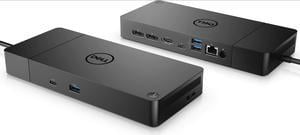
Dell M3HVW Thunderbolt Dock WD19TBS Docking Station 180W Power Adapter (130W Power Delivery) 210-AZBI
- Part Number: WD19TBS
- Dimension: 8.07 x 3.54 x 1.14
- Weight: 1.6
- Features: 0 DVI Output |1 HDMI Output |0 S-Video |0 USB 2.0 |3 USB 3.0 |0 VGA
- Model #: Dell-WD19TBS
- Item #: 9SIA0SXKWB6973
- Return Policy: View Return Policy
$128.97
Free Shipping
- Works very well with Dell products - Works with other products (I use mine with a Lenovo Thinkpad T14 and it works fine) - Long thunderbolt docking cable. Many other docks, while cheaper, do not have a long cable which makes cable management and flexibility an absolute nightmare.
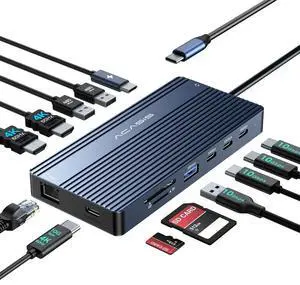
ACASIS USB C Docking Station Dual HDMI Monitor, Laptop Docking Station 3 Monitors, 2 * 4K HDMI+1080p VGA+100W PD+Ethernet+3 USBC 10Gbps+SD/TF+Audio Adapter, USB C Hub for Dell/Lenovo/HP/ThinkPad
- Model #: DS0203
- Item #: 9SIAP1ZKPP2703
- Return Policy: View Return Policy
$50.00
$56.99
Free Shipping

ASUS TUF A18 5070 Gaming Laptop, 18" WQXGA 240Hz Display, AMD Ryzen 7 260 (beats Intel i7-14700), NVIDIA RTX 5070, 32GB RAM, 1TB SSD, RGB Backlit KB, Bundle with PCO Laptop Cooler
- Brand: ASUS
- Model: FA808U_240W
- Screen Size: 18.0"
- Model #: TUFA181633-B_CTO_NBU1
- Item #: 9SIB0GJKTZ0519
- Return Policy: View Return Policy
$1,909.00
$2,709.00
Free Shipping
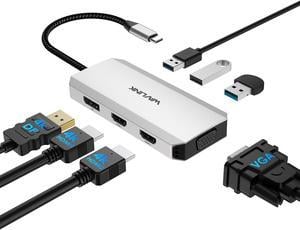
WAVLINK USB-C Dual HDMI Adapter 4K@60Hz, 7-in-1 Laptop Docking Station with 2xHDMI, 1xDisplayPort, VGA, USB-C HDMI Splitter for 4 Displays, 3xUSB 2.0, Multiple Monitor Hub for MacBook/Dell/HP/Lenovo
- Part Number: 1x HDMI1 (4K@30Hz), 1x HDMI2 (4K@60Hz), 1x DisplayPort(4K@60Hz), 1x VGA(1080P@60Hz), 3 x USB2.0-A(480Mbps)
- Compatibility: Plug and play on Windows 11/10/8.1/8/7, Mac OS 10.8 or later, Chrome OS, Linux, iPad OS, Harmony OS, Android. Works with your USB-C Desktop PCs, Laptops, Tablets/Mobile Phones(OTG function required).
- Weight: 85g/3.0oz
- Features: 1x USB-C to Host with fixed 25cm cable Video Interface: 2*HDMI+1*DP+1*VGA Triple Display: up to 1x 4K@60Hz + 2x 4K@30Hz + 1080p@60Hz Single Display: (HDMI1 or DP)3840x2160@60Hz or (DP2)3840x2160@30Hz, or (VGA) 1080P@60Hz Support max 85W Power Delivery to Host 3x USB-A 2.0, for connection of USB-A devices like Keyboard, Mouse, etc. 1x USB-C PD IN 100W No driver
- Model #: WL-UMD304
- Item #: 9SIA6PFK313687
- Return Policy: View Return Policy
$29.99
Free Shipping
Works great. Had to download a driver though. Was really impressed by them sending me a replacement when the one I had purchased for my daughter for Christmas was stolen in the mail... envelope cut and no item delivered. No hassle at all just requested replacement answered their questions and received the dock 5 days or so later. This was during the week between Christmas and new year. A lot of companies would have balked or taken their time. Great job!!
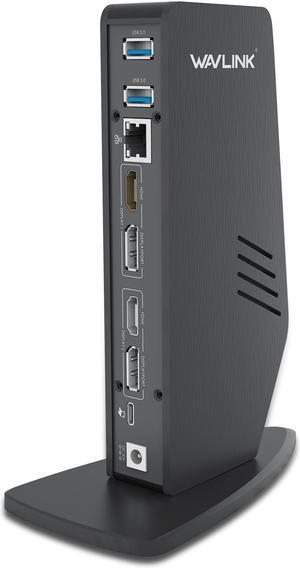
Wavlink USB 3.0/USB-C Dual 4K Universal Laptop Docking Station with Dual 4K@60Hz & Single 5K, 2 x DP, 2 x HDMI, 3 x USB 3.0, 2 x Type-C ports, Gigabit Ethernet, Audio&Mic For Windows Mac OS
- Compatibility: Windows 10, 8.1, 8, 7, XP systems, Mac OS 10.6 Donwards,-Mac OS 10.13.4 - 10.13.6 has single extended display support with AirPlay. No support on Linux/Unix or ARM based Windows operating systems (such as Surface RT)(MacOS Big Sur please download driver: https://www.synaptics.com/products/ displaylink-graphics/downloads/macos), Note: Need manual driver installation on Mac, then enable Screen Recording
- Ports Spec: THIS DOCK DOESN'T support Power Delivery function! ! 1 x Type-C (Connect to laptop) 2 x HDMI 2 x USB-C 2 x DisplayPort 3 x USB-A 3.0 1 x 4-Pole Phone Jack 1 x RJ45 Gigabit Ethernet 1 x DC Power Jack Port
- Parts: This dock DO NOT support charging pc !!!
- Model #: WS-UG69DK5
- Item #: 9SIA6PFD026784
- Return Policy: View Return Policy
$119.99
Free Shipping
I bought a new laptop and wanted to connect it to my 4K monitor + 1 full HD monitor in addition to the laptops screen. And this docking station did the trick.
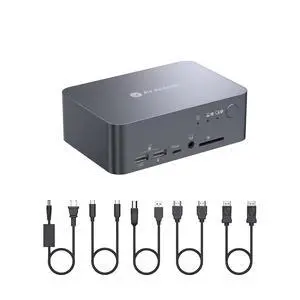
v AV Access Dual Monitor KVM Switch Docking Station 4K@60Hz Dual Monitor for Laptop & Desktop with USB C, USB 3.0, Ethernet, HDMI Output(iDock-C10)
- Brand: v AV Access
- Model: iDock C10
- Thunderbolt 3: Yes
- Function: Notebook
- Model #: iDock C10
- Item #: 9SIBVD9K925401
- Return Policy: View Return Policy
$259.99
Free Shipping
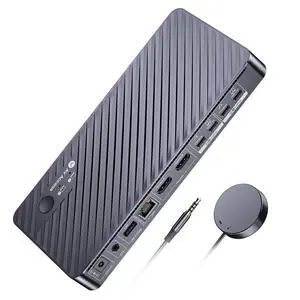
AV Access Docking Station KVM Switch 2 Monitors 2 Laptops, 4K KVM Switch Dual Monitor, 100W PD for Each PC, 1G Ethernet, EDID Emulation, Ideal for Home Office & Gaming(KD-E20)
- Brand: v AV Access
- Series: KVM switch docking station
- Model: KD-E20
- Part Number: KD-E20
- Model #: KD-E20
- Item #: 9SIBVD9KF44511
- Return Policy: View Return Policy
$169.99
$199.99
Free Shipping
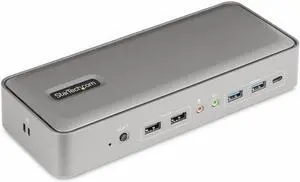
StarTech Dual-Laptop USB-C KVM Docking Station 129NUSBCKVMDOCK
- Model #: 129NUSBCKVMDOCK
- Item #: 1DN-001F-000R1
- Return Policy: 30-Day Return Policy
$297.99
Free Shipping
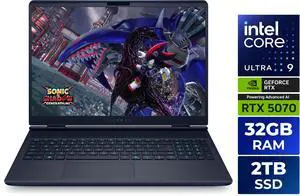
Alienware 16X Aurora Gaming Laptop - Intel Core Ultra 9 275HX - 32GB - 2TB SSD - NVIDIA GeForce RTX 5070 - Windows 11 Home LAC16251-9582BLU-PUS
- GPU/VPU: GeForce RTX 5070 Laptop GPU
- Processor Name: Intel Core Ultra 9 275HX
- Memory: 32GB DDR5
- SSD: 2TB
- Model #: LAC16251-9582BLU-PUS
- Item #: 9SIA8X5KS58161
- Return Policy: View Return Policy
$2,449.99
Free Shipping
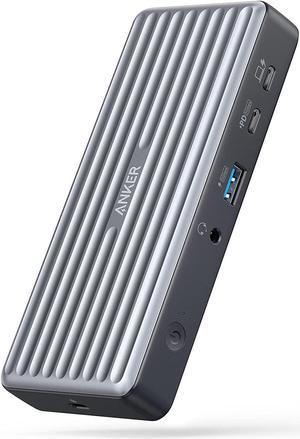
Anker USB C Docking Station, PowerExpand 9-in-1 USB-C PD Dock, 60W Charging for Laptop, 20W Power Delivery Charging, 4K HDMI and DisplayPort, USB 3.0 and USB 2.0 Data, Gigabit Ethernet, 3.5 mm Audio
- Dimension: 5.71 x 2.56 x 0.94 inches
- Weight: 0.41lb
- Labor: 18 Mnonths
- Model #: A83941A1
- Item #: 9SIACCUFJF3853
- Return Policy: View Return Policy
$99.99
Free Shipping
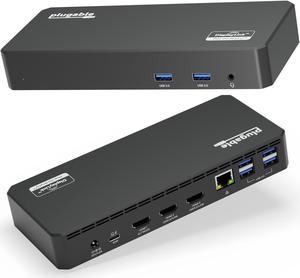
Plugable USB C Triple Display Docking Station with Laptop Charging, Thunderbolt 3 or USB C Dock Compatible with Specific Windows and Mac Systems (3x HDMI, 6x USB Ports, 60W USB PD)
- Brand: Plugable
- Part Number: UD-3900PDZ
- Color: Black
- Compatibility: Windows 10 / 11 & macOS 10.15.x and later, ChromeOS 100.x and later Supports full-featured USB-C, USB4, and Thunderbolt 3 / Thunderbolt 4 systems, including: M1 / M2 / M3 /M4 /M5 based MacBooks (M1 Pro/Max, M2 Pro/Max, M3 Pro/Max, M4 Pro/Max, M5 Pro/Max); Intel-based Thunderbolt 3 MacBooks (late 2016+) Dell XPS, Latitude, Inspiron series with full-featured USB-C, USB4, or Thunderbolt 3 / 4 Microsoft Surface Pro / Go / Book / Laptop models with USB-C, USB4, or Thunderbolt 4 HP ProBook, EliteBook, Spectre x360 series with full-featured USB-C, USB4, or Thunderbolt 3 / 4 Lenovo ThinkPad, IdeaPad, and Yoga with full-featured USB-C, USB4, or Thunderbolt 3 / 4 LG Gram with full-featured USB-C, USB4, or Thunderbolt 3 / 4 & thousands of other laptops which are compliant with full-fe...
- Model #: UD-3900PDZ
- Item #: 9SIA2XBBXA6726
- Return Policy: View Return Policy
$159.95
Free Shipping
- Extends my M1 Macbook Air display to 2 screens (up to 3)! - Includes USB-C charging - Wired LAN connector - USB 3.0 ports galore (6) - Flat, rather than tower, design - USB-C connector to computer is included, sturdy, and could be swapped or replaced
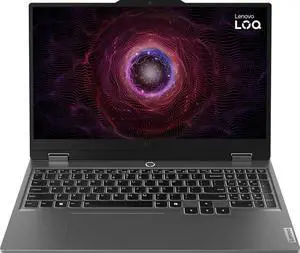
Lenovo LOQ Gaming Laptop - 15.6" FHD (1920x1080) 144Hz Display, AMD Ryzen 5 7235HS - 16GB Memory - 512GB SSD, NVIDIA GeForce RTX 4050 8GB GDDR6, Windows 11 Home - Luna Grey (83JC00LYUS)
- GPU/VPU: GeForce RTX 4050 Laptop GPU
- Processor Name: AMD Ryzen 5 7235HS
- Memory: 16GB
- SSD: 512GB
- Model #: 83JC00LYUS
- Item #: 9SIB32ZKPS9964
- Return Policy: View Return Policy
$839.99
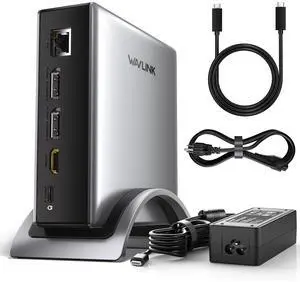
WAVLINK PD3.1 Triple Display USB C Docking Station with 140W Power, 8K Displayport*2 + 8K HDMI Triple Display Dock, RJ45, 10G USB-C, 2 USB-A 3.0,3.5mm Audio/Mic, for M1/M2/M3&Win
- Compatibility: Windows 11/10/8.1/8/7, macOS 11 or later (Can extend a different display ONLY), Chrome OS, Linux, iPadOS, Harmony OS, Android, iOS Works with your USB-C desktop PCs, laptops, tablets, and mobile phones (OTG function required).Computer at least has one full-functional USB-C port
- Ports Spec: with 2 DisplayPort and 1 HDMI port, supporting up to 8K@30Hz or 4K@144Hz on a single display. Charge your laptop at 125W via the PD 3.1 port, transfer data quickly with 2 USB-A (5Gbps) and 1 USB-C (10Gbps) ports, and connect to wired networks with the Gigabit Ethernet port. A...
- Model #: WL-UMD29 Pro
- Item #: 9SIA6PFKJM2282
- Return Policy: View Return Policy
$109.99
Free Shipping
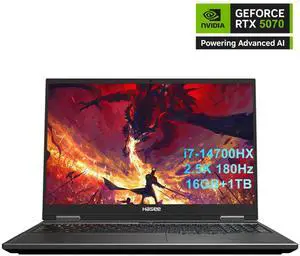
Hasee T8 Pro-16'' GeForce RTX 5070 Laptop GPU, Intel i7-14700HX-5.5GHz, AI Ready Gaming Laptop, 16GB DDR5 RAM, 1TB SSD, 16'' 180Hz QHD 100%sRGB IPS, RGB KB, WiFi7,BT5.4,Win11 Home
- GPU/VPU: GeForce RTX 5070 Laptop GPU
- Processor Name: Intel Core i7-14700HX
- Memory: 16GB
- SSD: 1TB
- Model #: T8Pro-T9 74618QX
- Item #: 9SIC11UKGE3529
- Return Policy: View Return Policy
$1,319.99
$1,999.99
Free Shipping
So far so good! Runs everything great, does not come with any bloatware, just the software for the performance. Laptop monitor pretty good as well. The plastic doesn't feel great but for this price, i would definitely recommend . Specially if you're someone who uses it docked to monitor and keyboard/mouse
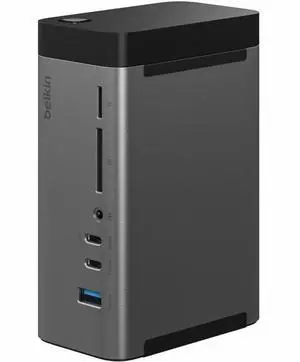
Belkin 11-in-1 Triple Display USB-C Docking Station - 10 Gbps - USB-A, - 4xUSB-C - 2xHDMI - Ethernet - 3.5mm Audio - SD - Micro SD - USB-C Cable - Grey INC020ttSGY
- Brand: Belkin
- Part Number: INC020ttSGY
- Model #: INC020TTSGY
- Item #: 1DN-000R-000M7
- Return Policy: 30-Day Return Policy
$190.99
Free Shipping
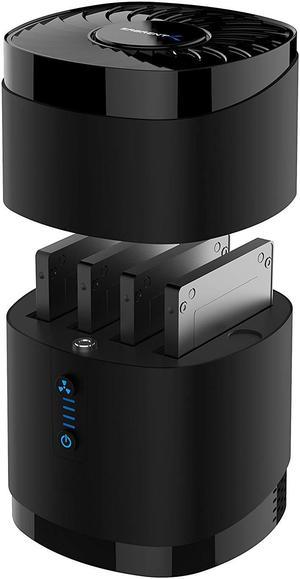
SABRENT USB 3.0 4 Bay 2.5 Hard Drive/SSD Docking Station with Fan (DS-4SSD)
- Type: Dock
- AC Adapter: Yes
- Material: Plastic
- Number of Bay: 4 Bay
- Model #: DS-4SSD
- Item #: 9SIBK19JR31691
- Return Policy: View Return Policy
$89.99
Free Shipping
In my mind, the whole product is a "pro". But, a few details on the product: 1. The in-cap fan is great & prevents heat buildup during prolonged use. You can separately toggle the fan on-off with a push button. I haven't opened the cap up, but I think it's basically an off-the shelf in-computer-case fan so I'm sure you could swap it out if it eventually dies on you. 2. So far no problems at all with the thing dismounting/disconnecting from my laptop. Super nice to see because I have had horrible experiences with USB enclosure hardware. 3. Data transfer rate is also fine and raises no red flags. I haven't done any perf testing, just commenting that on regular use I'm getting 100-200 MB/sec so at that point if you're using a USB enclosure, you better not be complaining ;-) 4. Size. Thank Heaven there was ONE enclosure out there that didn't support BOTH 2.5" and 3.5" hard disks. All of those are considerably larger than this. So yeah, you won't be putting 3.5" drives in this thing, which is something I personally viewed as a "plus". YMMV.
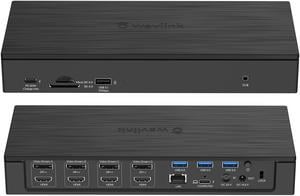
WAVLINK DisplayLink Laptop Docking Station, Quad Monitor 5K/4K@60Hz, 100W Charging For Thunderbolt 4/3, New MacBook Neo MacM1/M2/M3/Windows/Chrome With 4 HDMI, 4 DP, 180W Power, SD 4.0 CR, 2.5Gbps LAN
- Compatibility: Windows7/8/10(32/64-bit), Mac OS 10.8 or later, Chrome OS, Android, Ubuntu, performance might be limited on Ubuntu, Chrome OS and Android
- Ports Spec: total of 20 ports: 1 x DC in, 1 x DC out, 1 x USB-C(upstream), 4 x Displayport, 4 x HDMI, 1 x RJ45 Ethernet port, 1 x 4-Pole 3.5mm Phone Jack, 1 x SD Card Reader, 1 x TF Card Reader, 3 x USB3.0-A, 1 x USB3.1-A, 1 x
- Features: 1. This universal docking station works with USB Type-C, Thunderbolt 3 & compatible with USB Type-A computers. 2. 180Watt Power adapter provide maximum 100W power delivery to charge your computer. (Additional one DC output jack with 9 power tips provide maximum 100W for 19V-20V power input to laptops that do...
- Model #: WL-UG69PD10
- Item #: 9SIA6PFFNF0609
- Return Policy: View Return Policy
$259.99
Free Shipping
- Easy to set up, once plugged in, automatically configured properly - Allows me to use multiple monitors at the same time - Lots of connectivity options that fit my job requirements

MSI Thin 15 B13V THIN 15 B13VE-3047US 15.6" Gaming Notebook - Intel Core i7 13th Gen i7-13620H - 16 GB - 1 TB SSD - Windows 11 Home - NVIDIA GeForce RTX 4050 w/6 GB - Webcam - IEEE 802.11ax Wireless
- GPU/VPU: GeForce RTX 4050 Laptop GPU
- Processor Name: Intel Core i7-13620H
- Memory: 16GB
- SSD: 1TB
- Model #: THIN15133047
- Item #: 1TS-0016-05EG7
- Return Policy: 15-Day Return Policy
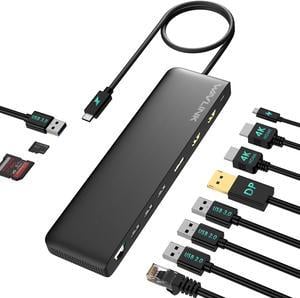
WAVLINK USB C Triple Display Docking Station, USB C Dock 85W Charging for PC, Max 4K@60Hz with DisplayPort, 2 x HDMI, PD, USB 2.0/3.0, Gigabit Ethernet, SD/TF Slot, Audio Jack for Windows&Mac
- Part Number: 2x HDMI: up to 4K@60Hz 1x DisplayPort: up to 4K@60Hz 1x USB C (power input): up to 100W 1x USB C (power output): up to 85W 1x Ethernet: up to 1Gbps 2x USB 3.0: up to 5Gbps 2x USB 2.0: up to 480Mb/s 1x SD Card Reader: max 25MB/s 1x Micro SD Card Reader: max 25MB/ s 1x Audio/Mic(4-Pole)
- Compatibility: -Windows 11/10/8.1/8/7/XP/Vista -Mac OS 10.x or later -Chrome OS -Android -Harmony OS -iPadOS -Linux
- Weight: 245g/8.6oz
- Features: MST triple displays to extend different pages to 3 monitors 4K displays, featuring 2 x HDMI and 1 x DisplayPort PD3.0 passthrough charging, with power in 100W to charge your laptop up to 85W Multiple USB A ports, Gigabit Ethernet port, Audio/Mic jack, card readers to make up for missing functions of computer Driver-free...
- Model #: WL-UMD09
- Item #: 9SIA6PFJN79794
- Return Policy: View Return Policy
$45.99
Free Shipping
Very compact and has a ton of ports! This makes it so easy to quick connect to my devices when I get home from work! Feels like a good quality part as well!
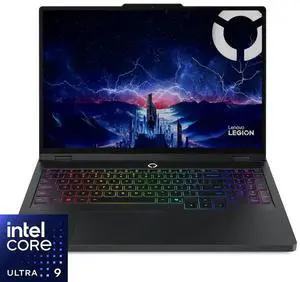
Lenovo Legion Pro 5i Gaming Laptop - 16 inch WQXGA (2560x1600) 165Hz OLED Display , Intel Core Ultra 9 275HX, 32GB DDR5 RAM - 1TB SSD, NVIDIA GeForce RTX 5070 8GB GDDR7, Windows 11 Home -Eclipse Black
- GPU/VPU: GeForce RTX 5070 Laptop GPU
- Processor Name: Intel Core Ultra 9 275HX
- Memory: 32GB
- SSD: 1TB
- Model #: (83F3000AUS)
- Item #: 9SIB32ZKU62115
- Return Policy: View Return Policy
$1,899.99
Free Shipping